Photo to PDF Converter
Upload photos, phone pictures, scans, receipts, homework, and document images and get one clean PDF back in seconds.
Upload phone photos, receipts, homework, forms, certificates, or any image file and download one PDF. Everything happens right in your browser.
photo to PDF — ready in seconds, no sign-up needed.
Photo to PDF converter
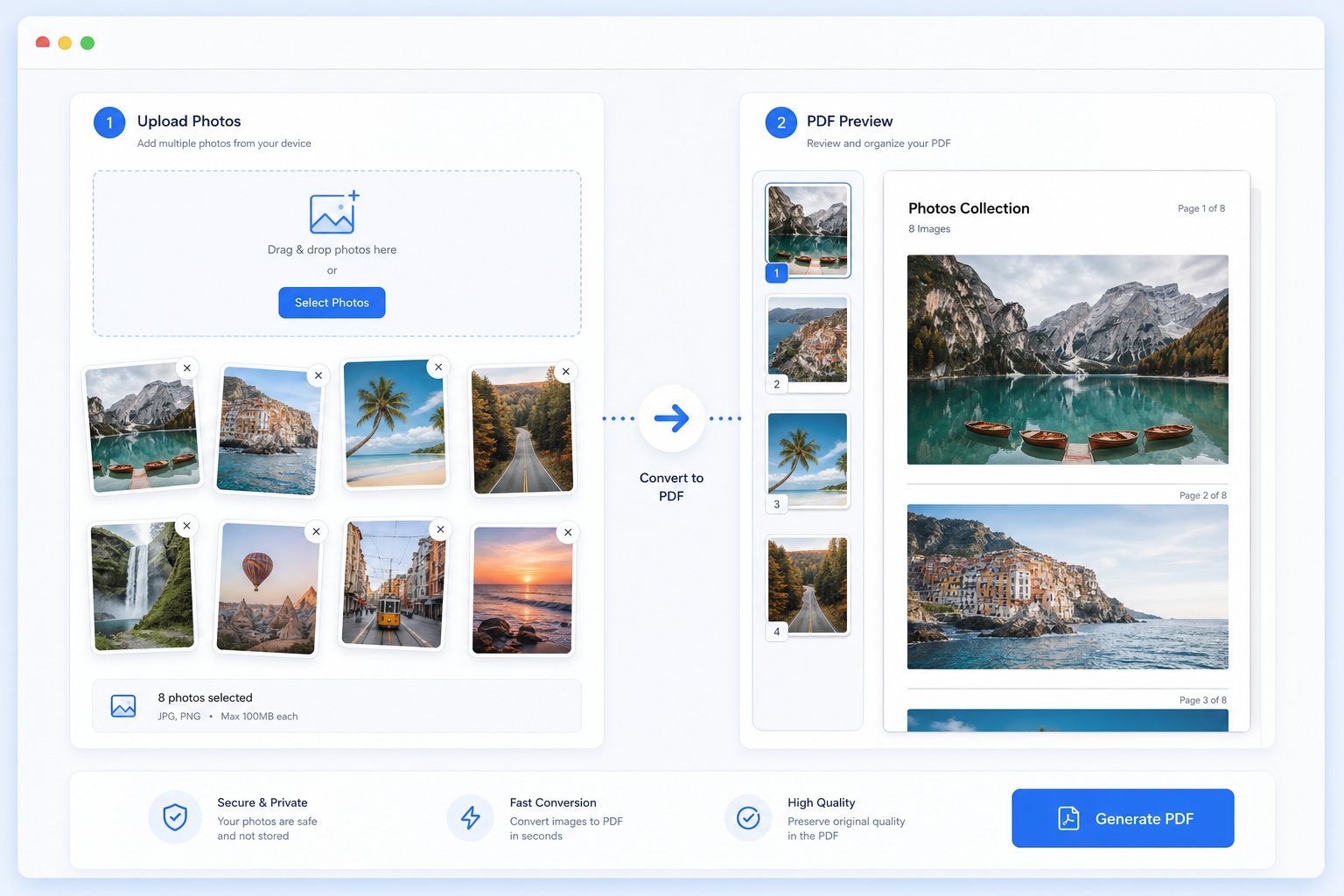
Drop your photos, arrange them in order, rotate any that are sideways, choose compression and layout, then download one PDF. Your images never leave your device — no uploads, no copies on a server.
Drop photos here
or tap to choose JPG, PNG, WebP, GIF, BMP images
+ Add photosWhat problem this solves
You have a mix of phone photos, screenshots, and document pictures, but the website only accepts one PDF file.
What result you should get
Download one organized PDF ready to send, upload, print, or save — no more file-by-file submissions.
Who this is for
For students turning in homework, parents sending forms, office workers organizing receipts, and anyone who needs one clean PDF from several images.
What this tool helps you do
- • Convert multiple photos to one PDF
- • Supports JPG, PNG, and WebP
- • A4, Letter, or auto page height
- • Margins, orientation, fit mode, and quality controls
- • Browser-local conversion with no required upload
How to use it
- 1. Upload your photos
- 2. Choose page size, margin, fit mode, and quality
- 3. Create the PDF in your browser
- 4. Download the finished PDF
Why ordinary users choose this tool
Why people choose PhotoToPDF
- • Upload your images and download a PDF in seconds — no account, no email, no waiting.
- • Works with photos, screenshots, receipts, and document images — all in one tool.
- • Adjust page size, quality, margins, and orientation from one screen before you download.
- • Your original files never leave your device unless you choose a server-side tool.
Advantages over many similar tools
- • Clearer beginner guidance than many generic PDF sites.
- • Better fit for mixed photo workflows, not just flat scanned pages.
- • Useful internal links to JPG to PDF, PNG to PDF, and compression flows.
- • Practical settings without overwhelming people.
Common situations for this tool
School and homework
Turn assignments, notebook pages, and screenshots into one clean file that submission portals can accept.
Work, records, and forms
Prepare office uploads, HR forms, reimbursement docs, records, and applications without jumping between tools.
Phone photos and quick captures
Start from iPhone or Android and get cleaned, resized, or PDF-ready files in one workflow.
What problem this solves
You have a mix of phone photos, screenshots, and document pictures, but the website only accepts one PDF file.
What result you should get
Download one organized PDF ready to send, upload, print, or save — no more file-by-file submissions.
Who this is for
For students turning in homework, parents sending forms, office workers organizing receipts, and anyone who needs one clean PDF from several images.
Searches and file needs this page covers
This page covers the most common search terms and real upload problems — so you can find what you need fast.
Privacy and processing
Your files stay on your device during conversion. Start with the simplest tool — only move on if your upload still fails.
Result preview
Where people usually use this tool
Phones and screenshots
Convert iPhone and Android photos, screenshots, scans, and quick document captures from any mobile browser.
School and office uploads
Upload homework, forms, receipts, and applications to any system that only accepts specific file formats.
After this tool finishes
After this step, you may need compression, resizing, or another conversion depending on your upload requirement.
Recommended next steps
JPG to PDF Converter
Turn your JPG or JPEG images into a PDF ready for upload forms, email attachments, school submissions, or work documents.
Go to next step →PNG to PDF Converter
Turn PNG screenshots, scans, and transparent images into crisp PDF pages for upload or sharing.
Go to next step →Compress Photo to PDF
Make your photo-PDF smaller while keeping it readable — perfect when a school, work, or government portal has a strict size limit.
Go to next step →Related keyword paths
Users often reach this page through search terms like photo to PDF, image to PDF, convert photos to PDF, upload help, make image smaller, screenshot to PDF, or multiple images to PDF. These related tool paths help capture those next steps.
Related tools
FAQ
What is photo to PDF used for?
It is used when several phone photos or document images need to become one PDF for school, work, forms, email, or records.
Can I combine multiple photos into one PDF?
Yes. Upload several photos, screenshots, or scanned images and they all come out as a single PDF file.
Why use PhotoToPDF instead of a generic converter?
Your PDF will be small enough for most everyday uploads. If it still fails, use compression or resizing to shrink it further.
Can this help with upload problems?
Yes. Many people use photo to pdf converter because a form, school portal, office website, or email workflow requires a smaller, clearer, or more compatible file.
What should I use after this tool?
After this step, many users continue into Photo to PDF, Image to PDF, JPG to PDF, PNG to PDF, Image Compressor, or Image Resizer depending on the final upload requirement.
What people usually do next
After this step, many people continue into another converter, cleanup tool, compressor, or PDF workflow depending on the final upload requirement.